How Scratch Transformed Creativity—and What’s Next

Table of Contents
- The Complete Overview of Scratch
- Historical Background and Evolution
- Core Mechanisms: How It Works
- Key Benefits and Crucial Impact
- Major Advantages
- Comparative Analysis
- Future Trends and Innovations
- Conclusion
- Comprehensive FAQs
- Q: Is Scratch only for children?
- Q: Can I use Scratch for professional projects?
- Q: How does Scratch teach coding concepts?
- Q: Are there Scratch alternatives for advanced users?
- Q: How can educators integrate Scratch into lessons?
- Q: Is Scratch free to use?
- Q: Can I use Scratch for game development?
- Q: How does Scratch handle privacy and safety?
- Q: What’s the difference between Scratch 3.0 and earlier versions?
- Q: How can I contribute to Scratch’s development?
The first time a child drags a "when green flag clicked" block onto a sprite and watches their creation spring to life, something shifts. It’s not just the thrill of making a game or animation—it’s the quiet realization that code isn’t just for experts. It’s a tool for expression, a playground where logic meets imagination. That moment is the heart of Scratch, a platform that has redefined how millions learn to think computationally, create collaboratively, and solve problems in ways that feel as natural as drawing or storytelling.
What began as an experimental project at MIT’s Media Lab in the early 2000s has since grown into a global phenomenon, with over 100 million projects shared by users across 200 countries. Scratch isn’t just software; it’s a cultural movement, a bridge between abstract programming concepts and tangible, shareable art. Its visual block-based coding interface lowers barriers for beginners while still offering depth for advanced users. But beneath its playful surface lies a sophisticated system designed to teach computational thinking—problem-solving, iteration, and systems analysis—through play.
The platform’s influence extends far beyond classrooms. Independent artists use Scratch to prototype interactive installations, educators repurpose its libraries for cross-disciplinary lessons, and even professional developers credit it with sparking their careers. Yet for all its success, Scratch remains a work in progress, constantly evolving to meet the needs of a new generation of creators. How did it get here? What makes it tick? And where is it headed next?
The Complete Overview of Scratch
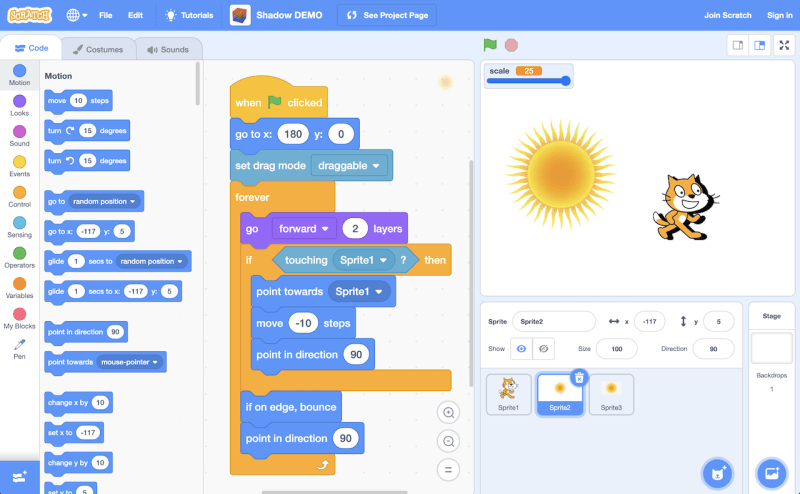
At its core, Scratch is a visual programming environment that lets users create stories, games, and animations by snapping together colored blocks of code. Each block represents a command—movement, sound, loops, conditionals—arranged like Lego pieces to build interactive projects. The platform’s strength lies in its low-floor, high-ceiling design: simple enough for a 6-year-old to make a cat dance, yet flexible enough for a teenager to simulate complex systems or an adult to build a multiplayer game. This duality has made it indispensable in STEM education, where it teaches foundational concepts like variables, events, and algorithms without overwhelming novices.Beyond coding, Scratch fosters a collaborative ecosystem. Users can remix others’ projects, adding their own twists to existing creations—a practice that mirrors real-world innovation. The platform’s online community (scratch.mit.edu) hosts forums, challenges, and a gallery of over 10 million shared projects, from pixel-art games to simulations of historical events. This social dimension turns learning into a shared experience, where feedback and iteration are baked into the process. For many, Scratch isn’t just a tool; it’s a creative home.
Historical Background and Evolution
The origins of Scratch trace back to 2003, when MIT researchers Mitchell Resnick, Natalie Rusk, and others sought to democratize coding. Inspired by Seymour Papert’s constructionist learning theory—the idea that people learn best by creating—Resnick’s team developed a prototype called Squeak, a multimedia environment for children. By 2007, they launched Scratch 1.0, a standalone application with a drag-and-drop interface and a built-in player for sharing projects. Its success was immediate: within a year, over 1 million projects were uploaded, proving that kids could—and would—code if given the right tools.The platform’s evolution reflects broader shifts in technology and education. Scratch 2.0 (2013) introduced cloud-based projects and a flash-based player, making it accessible via web browsers. Scratch 3.0 (2019) embraced modern standards with a JavaScript-based engine, offline capabilities, and extensions for hardware like micro:bits and LEGO Boost, expanding its reach into physical computing. Each iteration addressed technical limitations while staying true to its mission: to make programming inclusive, intuitive, and joyful. Today, Scratch is used in over 150 countries, translated into 70+ languages, and integrated into curricula from Finland to Singapore.
Core Mechanisms: How It Works
Under the hood, Scratch operates on three interconnected layers: coding, media, and sharing. The coding layer uses block-based syntax, where each block corresponds to a command (e.g., `move 10 steps`, `play sound [meow]`). These blocks are categorized by function—control (loops, conditionals), motion, looks (costumes and effects), sound, and events (triggers like clicks or keypresses). The genius of this system is its visual feedback: as blocks are stacked, users see immediate results in the project’s "stage," reinforcing cause-and-effect learning.The media layer is equally crucial. Users can import their own sprites (characters), backgrounds, and sounds, or use Scratch’s built-in library of vector graphics, samples, and remixable assets. This encourages creativity beyond pure logic, blending art and programming. Finally, the sharing layer—Scratch’s social backbone—allows users to publish projects, comment on others’, and join collaborative studios. The platform’s remix feature (a fork of someone else’s work) mirrors open-source culture, teaching users that creation is rarely solitary.
Key Benefits and Crucial Impact
Scratch has reshaped how we approach learning, not just in coding but in critical thinking itself. Studies from Harvard and MIT show that students using Scratch develop stronger problem-solving skills, persistence, and collaboration—traits that translate across disciplines. Its impact isn’t limited to tech; teachers in humanities and arts use Scratch to model narratives, design interactive timelines, or even compose music. The platform’s ability to democratize creation has also inspired movements like ScratchEd (a community for educators) and Scratch Day, an annual global celebration of digital creativity.What sets Scratch apart is its scalability. A child can start with a simple animation, while an advanced user can build a multiplayer game with physics engines or a data visualization tool. This adaptability makes it a bridge between beginner and expert, play and profession. As Resnick often notes, "The best way to learn is to do." Scratch embodies that philosophy, turning abstract concepts into tangible, shareable experiences.
"Scratch isn’t just about learning to program; it’s about learning to think creatively, reason systematically, and work collaboratively—essentially, the kind of thinking computers can’t do, and that we need most." — Mitchell Resnick, LEGO Papert Professor of Learning Research at MIT
Major Advantages
- Accessibility: No prior coding experience required. The visual interface reduces syntax errors and frustration, making it ideal for absolute beginners.
- Cross-Disciplinary Learning: Integrates art, math, storytelling, and logic, making it a tool for holistic education beyond STEM.
- Community and Collaboration: The global platform encourages sharing, feedback, and remixing, fostering a culture of open innovation.
- Real-World Applicability: Skills learned in Scratch—debugging, modular design, event-driven programming—directly transfer to languages like Python or JavaScript.
- Hardware Integration: Extensions for microcontrollers (Makey Makey, Arduino) and robotics (LEGO, Sphero) expand Scratch into physical computing, blending digital and tangible creativity.
Comparative Analysis
While Scratch dominates in beginner-friendly coding, other platforms cater to specific needs. Below is a side-by-side comparison of key alternatives:| Feature | Scratch | Alternative |
|---|---|---|
| Primary Audience | Kids (5–16), educators, hobbyists | Blockly (Google): Schools/teachers; Snap! (Berkeley): Advanced beginners |
| Learning Curve | Low (visual, playful) | Blockly: Moderate (text-to-block hybrid); Snap!: Steeper (more advanced blocks) |
| Hardware Support | Extensions for micro:bits, LEGO, etc. | Blockly: Limited; Snap!: Limited to sensors via custom blocks |
| Community & Sharing | Massive (100M+ projects, global studios) | Blockly: Smaller; Snap!: Niche but active |
Future Trends and Innovations
The next decade of Scratch will likely focus on expanding its reach into AI, accessibility, and real-world applications. MIT is exploring "Scratch for AI", where users could train simple machine-learning models by dragging blocks—democratizing data science. Meanwhile, projects like ScratchJr (for ages 5–7) and Scratch Senior (for adults) aim to broaden the platform’s age range. Accessibility improvements, such as screen-reader support and customizable interfaces, will also prioritize inclusivity.Beyond coding, Scratch could evolve into a multi-modal creation tool, integrating text generation (via AI), 3D modeling, or even VR/AR interactions. The platform’s biggest challenge will be balancing innovation with its core philosophy: keeping creation joyful and intuitive. As Resnick puts it, "The future of Scratch isn’t about making it more like traditional programming—it’s about making programming more like Scratch."

Conclusion
Scratch is more than a programming language; it’s a cultural artifact that has redefined what it means to learn by doing. By combining visual simplicity with deep conceptual rigor, it has given millions the confidence to see themselves as creators. Its impact stretches from classrooms to corporate innovation labs, where former Scratch users now design games, build robots, or lead tech teams. Yet its most enduring legacy may be the mindset it instills: that problems are puzzles to solve, not barriers to fear.As technology advances, Scratch will continue to adapt—whether through AI integration, new hardware, or global collaborations. But its essence remains unchanged: a belief that everyone can create, everyone can learn, and the best way to understand the world is to build it yourself.
Comprehensive FAQs
Q: Is Scratch only for children?
A: While designed for ages 8–16, Scratch is used by adults for prototyping, education, and art. Many professional developers use it to quickly test ideas before moving to languages like Python. The platform’s simplicity makes it beginner-friendly at any age.
Q: Can I use Scratch for professional projects?
A: Scratch is best for prototyping, education, or small-scale projects. For professional games or apps, you’d later export logic to engines like Unity or Godot. However, some indie developers have built entire games (e.g., Pico’s School) using Scratch as a foundation.
Q: How does Scratch teach coding concepts?
A: Scratch uses block-based coding to teach core concepts like loops (`repeat until`), conditionals (`if-then`), and variables (`set [x] to [10]`). Each block maps to a programming principle, with immediate visual feedback (e.g., a sprite moving) to reinforce learning.
Q: Are there Scratch alternatives for advanced users?
A: Yes. Snap! (by UC Berkeley) offers more advanced blocks (e.g., lists, recursion), while Blockly (Google) is used in educational tools like Code.org. For text-based coding, Python’s Turtle module or Alice (3D animation) are alternatives, though they lack Scratch’s social ecosystem.
Q: How can educators integrate Scratch into lessons?
A: Educators use Scratch for cross-curricular projects: math (simulating algorithms), history (interactive timelines), or art (animated stories). MIT’s ScratchEd community provides lesson plans, and platforms like Code.org offer structured courses. Many schools also host Scratch Clubs for extracurricular coding.
Q: Is Scratch free to use?
A: Yes, Scratch is completely free, including its online editor, project hosting, and community features. MIT funds its development through research grants and donations, ensuring no paywalls. Offline versions (e.g., Scratch Desktop) are also available.
Q: Can I use Scratch for game development?
A: Absolutely! Scratch is ideal for 2D games (platformers, puzzles, RPGs). Users can create games with physics, scoring systems, and multiplayer via the Scratch Link extension. While limited for AAA titles, it’s perfect for learning game design fundamentals.
Q: How does Scratch handle privacy and safety?
A: Scratch prioritizes safety with moderated content, age-appropriate settings, and tools to report inappropriate projects. Users under 13 can only interact with approved accounts, and all projects are scanned for harmful content. MIT’s Scratch Team actively monitors the community.
Q: What’s the difference between Scratch 3.0 and earlier versions?
A: Scratch 3.0 (2019) shifted to a web-based JavaScript engine, added offline mode, and introduced extensions for hardware (e.g., LEGO Boost). It also improved accessibility (keyboard navigation, screen-reader support) and added pen blocks for drawing. Older versions (1.x/2.x) are still usable but lack these features.
Q: How can I contribute to Scratch’s development?
A: MIT welcomes contributions via GitHub (for code), translation projects (70+ languages), or educator resources. Volunteers can also join Scratch Team roles (moderation, design) or donate to support the platform’s open-source future.
Leave a Comment
Comments are moderated before appearing. The data you submit is processed according to the Privacy Policy of Climate Columbia News.